Technical Guides
Variables From Tags to_Custom_Codes
This document explains how to define variables inside INS tags and VAST tags, and how these variables are accessed inside your custom methods.
It also includes syntax, examples, naming conventions, usage flow, and best practices.
1. Overview
Variables allow you to pass dynamic values from the ad tag (INS or VAST) directly into your custom code logic.
You can control creative behavior such as:
- Colors
- Text
- URLs
- Durations
- Images & assets
- Screen properties
- Widget-level properties
This helps make creatives dynamic without re-uploading or editing visuals.
2. Variables in INS Tags
data-var-{name}="{value}"
Rules
- Replace {name} with your variable name
- Replace {value} with your desired value
- Use lowercase, hyphen-friendly variable names
- Add unlimited variables
- All variables become available in your custom code
<ins id="adctv"
     class="adctv-ads"
     data-tenant="1"
     data-cdn="https://ads.adctv.com/"
     data-user="54"
     data-campaign="69284d2b2282b"
     data-placement="69313f977d871"
     data-creative="69313829e374f"
     data-height="600"
     data-width="300"
     data-responsive="false"
     data-adtype="generic_ad"
     data-env="false"
     data-var-img="https://ads.adctv.com/assets/1/3b/6931551b16f3b.png"
     data-var-bgcolor="yellow">
</ins>

<script src="https://ads.adctv.com/scripts/src/v2/tag.ins/tag.ins.js"></script>
How variables appear inside your custom method
variables.bgcolor
variables.img
3. Variables in VAST Tags
&var-{name}={value}
Example — VAST URL
https://example.com/vast.xml?creative=123&placement=45 &var-theme=dark &var-autoplay=true &var-volume=0.5
Inside your custom logic
variables.theme       // "dark"
variables.autoplay    // "true"
variables.volume      // "0.5"
4. Accessing Variables Inside Custom Methods
Below are the steps required to apply tag variables inside your creative.
4.1 Select “Events” Tab

4.2 Select a Trigger from the List


4.4 Create a New Method
You can now write your own custom code.

4.5 Writing Custom Code (Example)
In this example, the creative uses two components:
Countdown Timer
Image Component
The image component has no uploaded asset.
Instead, we inject the image dynamically using a variable from the tag.
We use:
- img → for image URL
- bgcolor → for screen background color
Accessing variables
variables.img
variables.bgcolor
Important:
To apply variables to a specific component, select the element by its ID first.The widget and screen IDs will visible on custom method codeblocks

Sample Custom Code
/*
Layers and their IDs
 Screen list
 Screen 1 = #s10001_14318

 Widget list
 Countdown = #w10006_74144
 Image = #w10007_24899
*/
let img = document.querySelector("#w10007_24899");
img.children[0].setAttribute("source", variables.img);

let screen = document.querySelector("#s10001_14318");
screen.style.background = variables.bgcolor;
4.6 Save the Custom Event

4.7 Export the Creative

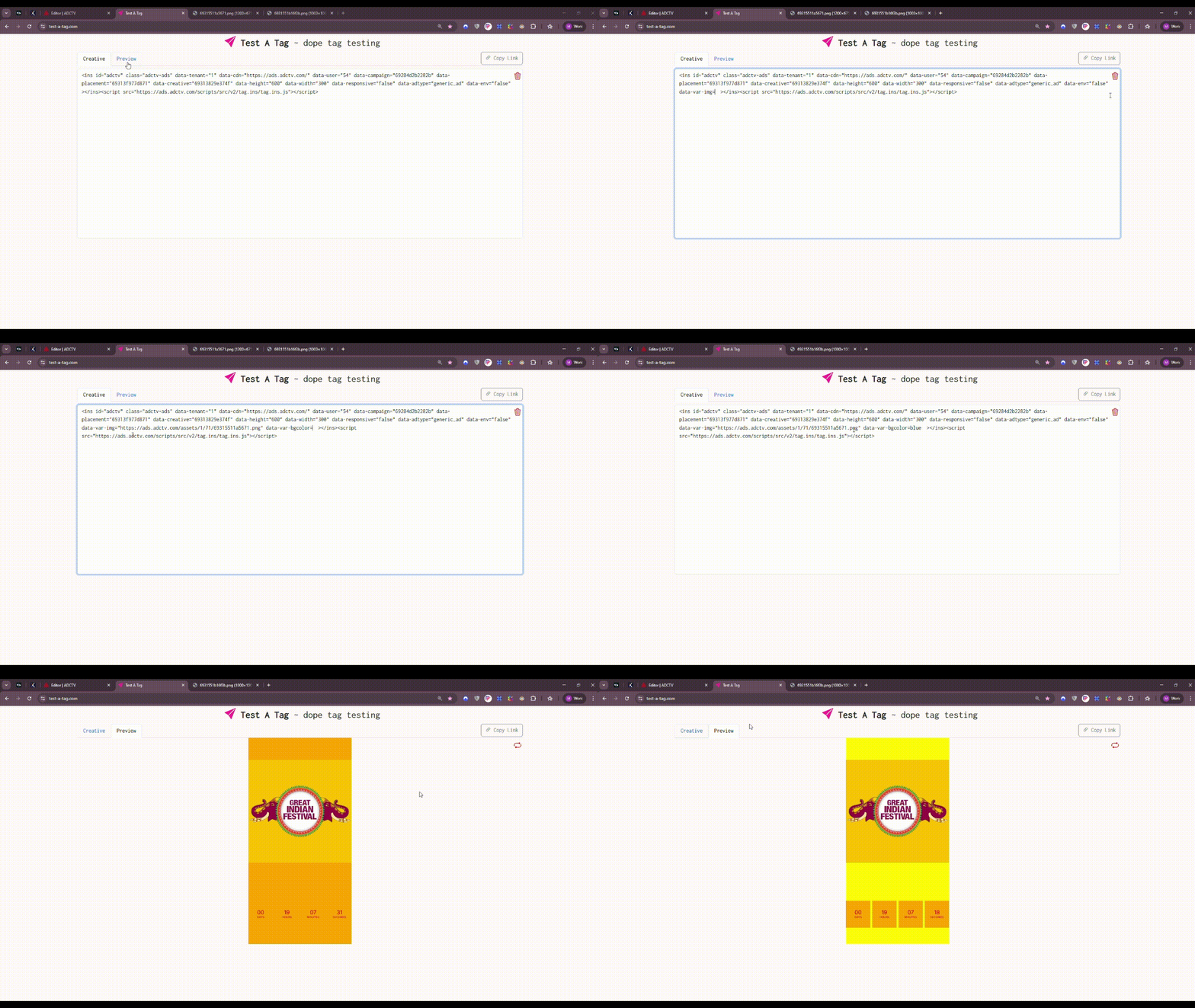
5. Updating Variables in the Tag
Use the exported INS/VAST tag on your domain and append the variables you want to control.
These variables will be available inside your custom code through:
variables.{name}
// or
variables["{name}"]
Example INS Tag with Variables
<ins id="adctv"
     class="adctv-ads"
     data-tenant="1"
     data-cdn="https://ads.adctv.com/"
     data-user="54"
     data-campaign="69284d2b2282b"
     data-placement="69313f977d871"
     data-creative="69313829e374f"
     data-height="600"
     data-width="300"
     data-responsive="false"
     data-adtype="generic_ad"
     data-env="false"
     data-var-img="https://ads.adctv.com/assets/1/3b/6931551b16f3b.png"
     data-var-bgcolor="yellow">
</ins>
<script src="https://ads.adctv.com/scripts/src/v2/tag.ins/tag.ins.js"></script>
Variables used
- data-var-img
- data-var-bgcolor
Preview
6. Usage
Variables make creatives dynamic and reusable without modifying the creative.
By simply changing the variables inside the tag, you can deliver different versions instantly.
This eliminates the need to:
- Create multiple creatives
- Upload separate assets
- Manage separate placements
- Duplicate analytics
Analytics remain centralized in a single placement.
7. What Users Can Do With This
7.1 Update Widget-Specific Properties
Change component properties using variables:
- Text
- Colors
- Images
- Sizes
- Timings
- Visibility
- URLs
7.2 Create Region-Specific or Partner-Specific Content
Output variations for different:
- Headlines
- Offers
- CTAs
- Images
Perfect for large-scale distribution.
7.3 Enable Real-Time Content Updates
Marketing teams can change content instantly by editing tag variables.
- No rebuild
- No re-upload
- No developer needed
7.4 Reduce Operational Overhead
One creative → unlimited variations
Cuts down asset creation time and maintenance.
7.5 Support Dynamic Personalization
Variables allow personalization based on:
- Domain
- Audience segment
- Publisher
- Geo
- Campaign logic
Everything becomes adjustable from the tag.
Context Variables
Overview
Context Variables are values describing the user's current environment. They are resolved before the creative is rendered and are available for binding directly in components.
Context variables are divided into two categories:
- Context Variables – Values obtained directly from backend services (Geo, Weather, Network, Bot, Time).
- Advanced Context Variables – Values computed from one or more raw context variables.
Variable Categories
Category | Source | Description |
|---|---|---|
Geo | Backend | User location |
Weather | Backend | Current weather conditions |
Network | Backend | ISP, protocol, RTT |
Bot | Backend | Bot detection |
Time | Backend | Local time information |
Device | Browser | Device characteristics |
Viewport | Browser | Viewport dimensions |
Derived | Backend | Computed contextual values |
Context Variables
Geo
Variable | Type | Description |
|---|---|---|
| String | ISO country code |
| String | City name |
| String | State or region |
| Number | Latitude |
| Number | Longitude |
| String | IANA timezone |
Weather
Variable | Type | Description |
|---|---|---|
| Number | Temperature (°C) |
| Number | Feels-like temperature |
| Number | Humidity (%) |
| String | Weather condition |
| String | Icon URL |
| String | Description |
| Boolean | Day/Night |
| Number | Precipitation |
| Number | Wind speed |
| Number | UV Index |
| Number | Visibility |
| String | Sunrise |
| String | Sunset |
Time
Variable | Type | Description |
|---|---|---|
| Number | Unix timestamp |
| Number | Hour (0–23) |
| Number | Day index |
| String | IANA timezone |
Network
Variable | Type | Description |
|---|---|---|
| String | ISP name |
| Number | ASN |
| String | HTTP protocol |
| Number | Round-trip time |
Bot
Variable | Type | Description |
|---|---|---|
| Number | Null | Bot score |
| Boolean | Bot detection |
| Boolean | Corporate proxy |
Advanced Context Variables
Overview
Advanced Context Variables provide higher-level contextual information that creatives can consume directly without implementing business logic.
Weather
Variable | Parameters | Type | Possible Values | Description |
|---|---|---|---|---|
|
| String |
,
,
| Categorizes the current temperature. |
|
| String |
,
,
,
,
,
| Normalizes weather conditions into common categories. |
|
| String |
,
,
,
| Classifies UV intensity. |
|
,
| String |
,
,
,
| Indicates perceived outdoor comfort. |
|
| String |
,
,
,
| Categorizes wind intensity. |
|
| Boolean |
,
| Indicates whether it is currently daytime. |
|
| String |
,
,
,
| Classifies precipitation intensity. |
|
| String |
,
,
| Categorizes current visibility. |
|
,
,
,
| String |
,
,
| Indicates suitability for outdoor activities. |
Time
Variable | Parameters | Type | Possible Values | Description |
|---|---|---|---|---|
|
| String |
,
,
,
,
| Current part of the day. |
|
| Boolean |
,
| Indicates whether today is Saturday or Sunday. |
|
,
| Boolean |
,
| Indicates whether current time falls within typical work hours. |
|
| Boolean |
,
| Indicates typical commuting periods. |
|
| String |
,
,
,
,
| Current meal period. |
|
,
| String |
,
,
| General activity state based on time. |
Network
Variable | Parameters | Type | Possible Values | Description |
|---|---|---|---|---|
|
,
| String |
,
,
| Overall network performance classification. |
|
,
| Boolean |
,
| Indicates whether the connection is suitable for rich media. |
|
| String |
,
,
| Recommended video quality tier. |
Traffic
Variable | Parameters | Type | Possible Values | Description |
|---|---|---|---|---|
|
,
,
| String |
,
,
| Overall traffic quality assessment. |
|
,
,
| Boolean |
,
| Indicates potentially suspicious traffic. |
|
,
,
| Number |
| Numeric trust score for the request. |
Audience
Variable | Parameters | Type | Possible Values | Description |
|---|---|---|---|---|
|
,
,
,
,
| Number |
| Indicates how suitable current conditions are for outdoor activity. |
|
| String |
,
,
| Likelihood that the user is outdoors. |
|
,
,
,
,
,
,
| String |
,
,
| Estimated shopping intent. |
|
,
,
,
| String |
,
,
| Estimated likelihood of interacting with the creative. |
|
,
,
,
,
| String |
,
,
,
,
| Estimated current mobility state. |
|
,
,
,
,
| String |
,
,
,
| Estimated user mindset. |
|
,
,
,
,
| String |
,
,
| Estimated purchasing context. |
Device
Variable | Parameters | Type | Possible Values | Description |
|---|---|---|---|---|
|
,
| Boolean |
,
| Indicates whether the device and connection are suitable for rich media experiences. |
|
,
,
,
| String |
,
,
| Recommended creative experience tier. |
Media
Variable | Parameters | Type | Possible Values | Description |
|---|---|---|---|---|
|
,
| String |
,
,
,
| Recommended maximum video resolution for the current connection. |